A proper quality of service setup is more than a theoretical exercise; it’s a strategic imperative for network engineering, guaranteeing performance for mission-critical applications and ensuring business continuity. For IT professionals managing complex networks, QoS is the mechanism that prevents a single bandwidth-intensive process from degrading the performance of the entire infrastructure.
Why QoS Is Critical for Modern Business Networks

In a multi-WAN or SD-WAN environment, network management directly correlates to business outcomes. A well-implemented quality of service setup is the crucial link between network performance and operational success. It ensures that high-priority data packets receive preferential treatment, especially during periods of network congestion.
Consider a distributed enterprise where users rely on cloud-based SaaS platforms like Salesforce, Microsoft 365, and VoIP services. Without QoS, a few users initiating large file backups could instantly degrade the quality of an executive video conference. This is not merely an inconvenience; it’s a direct impact on executive-level communication and business agility.
Moving Beyond Basic Prioritization
Modern QoS extends beyond simple port-based rules for VoIP packets. It involves creating a sophisticated traffic hierarchy that aligns directly with organizational priorities. This requires a deep understanding of which applications are essential for revenue generation versus those that are less critical.
A common practice is to segment traffic into logical tiers:
- Real-time critical traffic: This class includes VoIP, video conferencing, and remote desktop sessions, which are highly sensitive to latency and jitter.
- Business-essential applications: This tier encompasses CRM, ERP, and other line-of-business software. These applications require consistent, reliable performance but are less sensitive than real-time traffic.
- Bulk or non-essential traffic: This category includes large file transfers, software updates, and non-business streaming. This traffic is designated as best-effort and can tolerate delays.
This level of granular, application-aware control is a core benefit of SD-WAN, allowing for policies based on application signatures rather than just ports or protocols. To explore this further, you can learn about how https://www.mushroomnetworks.com/blog/dynamic-qos-what-is-it-exactly-and-why-you-should-care/ functions in our detailed article.
The primary value of a Quality of Service setup is its ability to translate business policies into deterministic network behavior. It ensures that technology serves business objectives, protecting productivity and user experience under network stress.
To assist with implementation, the following table defines essential QoS terms within an SD-WAN context.
Essential QoS Terms in an SD-WAN Context
| Term | Definition in SD-WAN Context | Primary Use Case |
|---|---|---|
| Bandwidth Allocation | Designating a specific amount or percentage of a WAN link’s capacity for certain applications or traffic types. | Guaranteeing a minimum throughput for a critical application like a cloud-based ERP system. |
| Traffic Shaping | Delaying less critical packets to ensure that high-priority traffic flows smoothly, preventing congestion before it occurs. | Smoothing out bursty traffic from large file downloads to protect the performance of real-time video calls. |
| Packet Prioritization | Assigning a priority level to data packets based on the application they belong to (e.g., VoIP, video, email). | Ensuring voice packets from a VoIP call are sent ahead of packets for a routine software update. |
| Jitter Buffer | A temporary storage area on the receiving end that collects and reorders packets to minimize the effects of jitter. | Stabilizing a video conference feed to prevent stuttering and garbled audio, even if packets arrive out of order. |
Understanding these terms is the first step toward building intelligent, effective QoS policies that accurately reflect business requirements.
The Financial Impact of Service Quality
Aligning QoS policies with business objectives requires careful consideration of Service Level Agreements (SLAs), which define performance guarantees. The correlation between service quality and revenue is direct and quantifiable.
Recent data indicates that by 2025, nearly 73% of consumers are prepared to switch to a competitor following just a few poor service interactions. Conversely, three out of four customers are willing to spend more with businesses that provide an excellent service experience. The financial incentive for a robust QoS implementation is substantial.
Laying the Groundwork: Your Pre-Configuration QoS Blueprint
Initiating QoS configuration without a comprehensive plan is a common failure point in network deployments. An effective QoS setup is not about indiscriminately enabling features; it is about conducting a thorough pre-deployment audit. This discovery phase is essential for creating a blueprint based on empirical network traffic analysis and established business priorities.
The initial step is to identify all applications and services consuming bandwidth across the network. This should be done using firewall logs, NetFlow data, or dedicated network monitoring tools to gain an accurate picture. The goal is to determine not only what is running, but also who is using it and its bandwidth consumption during peak hours.
Classifying Traffic by Business Impact
With a complete application inventory, the next task is traffic classification. This process maps network resource allocation to specific business objectives. A prioritization matrix is an effective tool for communicating these classifications to both technical staff and business stakeholders.
This matrix should categorize applications based on their operational impact.
- Priority 1 (Real-Time Critical): This category is reserved for traffic where any performance degradation is immediately disruptive. Examples include VoIP calls, video conferences, and remote desktop sessions. These applications require strict priority guarantees.
- Priority 2 (Business Essential): This tier is for applications critical to business operations that can tolerate minimal delay, such as CRM, ERP, and other core SaaS platforms. Performance must be consistent, but they do not require the immediate handling of real-time protocols.
- Priority 3 (General Business): This includes standard productivity tools like email and general web browsing. While important, their traffic can be managed more aggressively during periods of network congestion.
- Priority 4 (Bulk/Best-Effort): This is the default category for traffic that should yield to higher-priority applications. It includes large file transfers, non-critical cloud backups, and any non-essential streaming.
A well-defined traffic matrix serves as the single source of truth for QoS implementation. It translates abstract business requirements into concrete, enforceable rules for the SD-WAN appliance, ensuring the entire quality of service setup is built on a data-driven foundation.
A Real-World Prioritization Example
Consider a mid-sized company with a central office and several branch locations. Following a network audit, their prioritization matrix might be structured as follows:
| Priority Level | Application Examples | Business Justification | QoS Action |
|---|---|---|---|
| P1 – Critical | Microsoft Teams Calls, RingCentral VoIP | Real-time communication is essential for sales and executive functions. | Guarantee bandwidth, prioritize over all other traffic. |
| P2 – Essential | Salesforce, NetSuite ERP | Core revenue-generating and operational platforms. | Ensure consistent performance with dedicated bandwidth pools. |
| P3 – General | Outlook, General Web Browsing | Standard business productivity. | Allow normal access but shape bandwidth during congestion. |
| P4 – Bulk | Dropbox Syncs, Windows Updates | High-bandwidth, non-urgent tasks. | Heavily limit bandwidth, schedule for off-peak hours if possible. |
Before policy application, a solid understanding of network capacity planning is critical. You must verify that your internet circuits can handle the prioritized traffic loads you intend to define.
Following this blueprint ensures that every configured QoS setting directly supports a specific, documented business requirement, eliminating guesswork and focusing on measurable results.
With the network traffic audited and priorities defined, the next step is to implement these rules. This is where a modern quality of service setup demonstrates its value, moving beyond legacy port-based rules to true application-aware intelligence. The enforcement of these policies begins with the core network routers and switches.
Modern SD-WAN platforms can identify thousands of applications out-of-the-box using deep packet inspection (DPI), from Microsoft Teams and Salesforce to Dropbox and YouTube. This capability is what allows for the creation of highly specific and effective policies.
From Identification to Actionable Rules
Application identification is the first step; the real utility lies in applying specific actions to that identified traffic. The following scenarios illustrate practical applications for IT professionals.
Scenario 1: Prioritizing Executive Video Calls Across All WANs
If the leadership team relies heavily on video conferencing, any latency or jitter is unacceptable. The objective is to provide their video traffic with the highest priority, regardless of the WAN link in use.
- The Rule: Create a policy that identifies traffic from the specific video conferencing platform (e.g., Zoom, Microsoft Teams).
- The Action: Assign this traffic to the highest priority queue. It is also possible to guarantee a specific percentage of bandwidth—for example, 15% of each WAN link. This ensures that even if other network activity causes congestion, the video call quality remains pristine.
Scenario 2: Isolating and Limiting Guest Wi-Fi Traffic
Guest Wi-Fi is a common business courtesy, but it must not impact business-critical operations. The goal is to contain this traffic and apply a strict bandwidth cap.
- The Rule: Identify all traffic originating from the guest VLAN or SSID.
- The Action: Assign this traffic to the lowest priority queue, often labeled “bulk” or “best-effort.” Then, apply a traffic shaping rule to cap its total bandwidth consumption at a fixed rate, such as 20 Mbps, guaranteeing it cannot monopolize primary connections.
This diagram visualizes the fundamental workflow for implementing these rules, from identification to resource allocation.
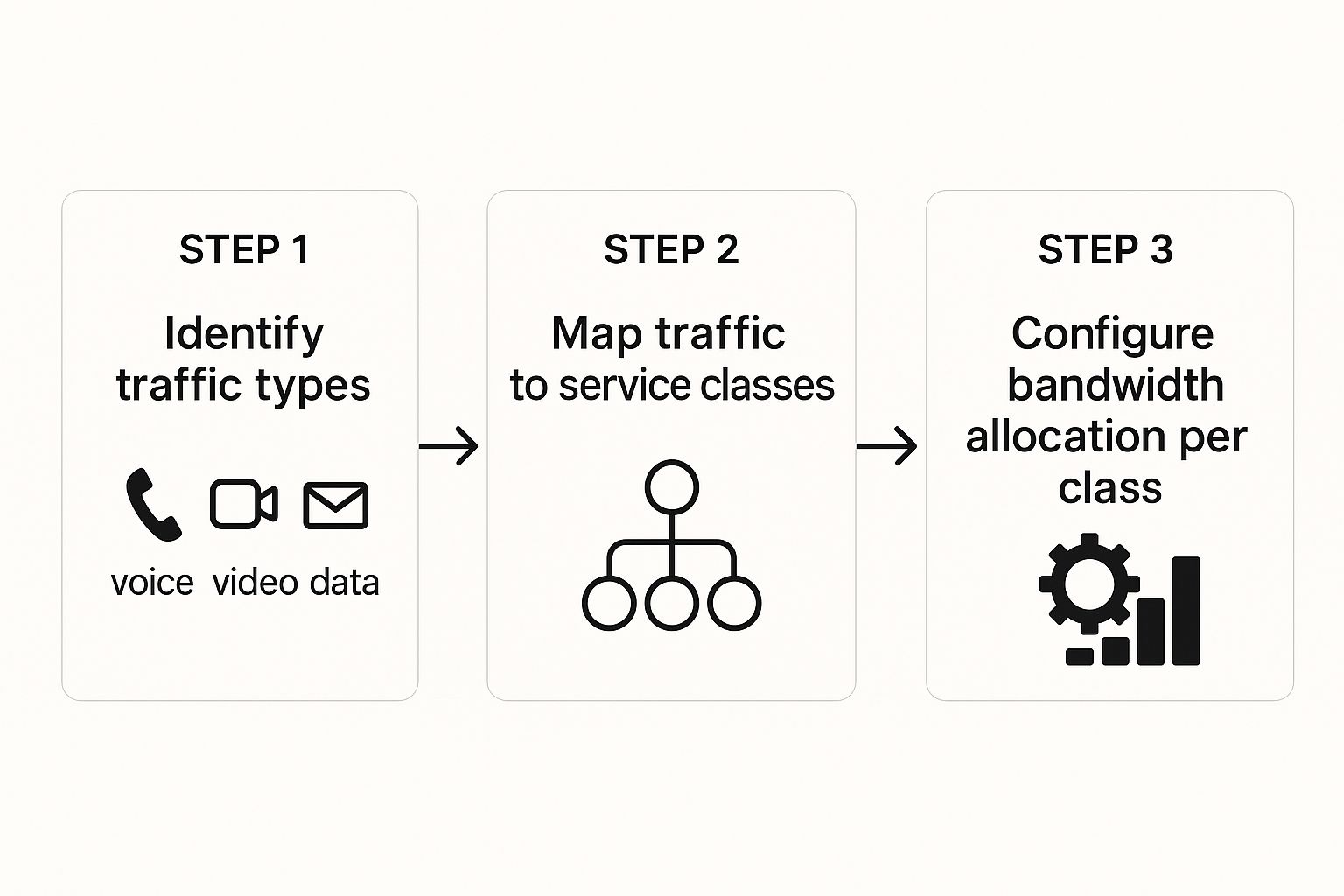
As shown, a robust QoS strategy follows a logical progression: identify traffic, classify its importance, and then allocate resources accordingly.
Implementing Policies in a Multi-WAN Environment
A key advantage of SD-WAN is its ability to manage multiple internet connections. QoS policies must be configured to leverage this capability. Rules can be designed not only to prioritize traffic but also to steer it over the optimal path for a given application.
For instance, a policy can be created to route all latency-sensitive VoIP traffic over a stable, low-latency fiber circuit, while simultaneously directing large, non-urgent file transfers over a higher-bandwidth (but higher-latency) cable connection. At this point, QoS converges with intelligent path selection, a cornerstone of SD-WAN. For a more technical explanation, our guide on how to set up QoS shapers on your device is an excellent resource.
Ultimately, a quality of service setup is not about blocking traffic but managing it intelligently. Aligning bandwidth allocation and priority with business objectives ensures that network resources are always directed toward the most critical operational needs.
Integrating QoS With Dynamic Path Selection
A static quality of service setup is a foundational step, but SD-WAN’s full potential is realized when QoS is integrated with dynamic path selection. This elevates network management from reactive traffic policing to creating an intelligent, self-healing architecture. The system builds policies that respond in real-time to the health of all available WAN links.
Instead of merely prioritizing traffic, this approach steers it based on live performance metrics like latency, jitter, and packet loss. This forms the basis of a resilient and proactive network that not only manages congestion but actively avoids it.
Building Proactive Routing Policies
The advanced functionality emerges from combining application-aware QoS rules with performance-based routing logic. In a typical scenario with a primary fiber connection and a secondary broadband link, a static configuration might only failover upon a complete outage of the primary link.
A dynamic setup is far more sophisticated. A rule can be implemented to continuously monitor the fiber link’s performance characteristics. For example, if latency for VoIP traffic on the fiber link exceeds 20ms, the SD-WAN appliance can automatically and seamlessly reroute all active and future calls over the more stable broadband link, often without any perceptible impact to the end-users.
This transition from reactive failover to proactive, performance-based path selection is a fundamental advantage of SD-WAN. It transforms the network from a system requiring constant intervention into one that autonomously maintains performance, ensuring a consistent user experience for critical applications.
This dynamic approach is increasingly critical as businesses adopt more real-time communication tools. The latest customer service statistics show a clear trend: by early 2025, while only 16.7% of businesses will have fully integrated services like video calls, 40% are already increasing investment in chatbot technology to reduce response times.
To support these initiatives, companies are investing in chatbots (44%), customer behavior analysis (42%), and knowledge base tools (29%). Each of these technologies depends on a network capable of delivering consistent, real-time quality. For a deeper analysis of these trends, refer to the full customer service report from digitalmindsbpo.com.
Comparing Common Path Selection Strategies
To implement this effectively, it is necessary to understand the path selection algorithms available on your SD-WAN appliance. Different applications have different network requirements, so matching the traffic type to the appropriate routing strategy is key to a successful quality of service setup.
There are several common methods, each with distinct advantages.
Comparing SD-WAN Load Balancing Algorithms
This table provides a breakdown of common SD-WAN load balancing algorithms and their optimal use cases.
| Algorithm | How It Works | Best For |
|---|---|---|
| Round-Robin | Distributes traffic sequentially across available WAN links. | Simple load distribution for general web traffic or bulk data where session persistence isn’t critical. |
| Weighted Round-Robin | Distributes traffic across links based on user-defined weights, giving more traffic to higher-capacity connections. | Asymmetrical connections, like sending 70% of traffic over a 1Gbps fiber link and 30% over a 300Mbps cable link. |
| Lowest Latency | Sends traffic down the path with the lowest measured latency in real-time. | Extremely latency-sensitive applications like VoIP, video conferencing, and remote desktop sessions. |
| Session-Based | Binds an entire user session to a single WAN link to prevent issues with applications that require session persistence. | Secure applications like online banking or e-commerce portals that can break if the source connection changes mid-session. |
By mastering these techniques, you can engineer a truly intelligent network. For example, you might use policy-based routing (PBR) to force all VoIP traffic down the lowest latency path, while pinning critical Salesforce sessions to the most reliable link. Concurrently, general web browsing can be load-balanced across all available connections. This multi-layered approach ensures every packet receives optimal treatment based on both its business priority and the real-time condition of the network.
How to Validate and Refine Your QoS Policies

A common error in network management is treating a quality of service setup as a one-time project. In reality, the initial deployment is merely the baseline. The true value is derived from a continuous cycle of validation, monitoring, and refinement of policies.
Without this feedback loop, the configuration’s effectiveness is unknown. It is impossible to determine if the implemented rules are genuinely improving user experience or simply reallocating resources on a congested link without meaningful impact.
The first step is to replace assumptions with empirical data. The built-in diagnostics of your SD-WAN appliance are the ideal starting point. These dashboards provide a high-level view of traffic classification and queuing across WAN links, serving as an initial health check to confirm that the configured rules are triggering as expected.
However, a high-level view is insufficient. It is necessary to analyze the key performance indicators (KPIs) that directly affect application performance. For high-priority queues—such as those for VoIP and video conferencing—it is essential to obsessively track latency, jitter, and packet loss. These metrics are the definitive report card for a successful QoS implementation.
From Data to Actionable Insights
Monitoring these KPIs reveals the real-world impact of your policies. For example, if you observe that latency for the Salesforce queue spikes every afternoon, this provides a clear starting point for investigation. Is another application consuming more bandwidth than anticipated? Are traffic shaping rules for bulk data transfers too permissive during business hours?
Here is a practical methodology for validating your setup:
- Check Your Queue Statistics: First, verify that traffic is being assigned to the correct priority queues. If VoIP traffic is being misclassified into the “best-effort” bucket, a rule is misconfigured.
- Analyze Performance Metrics: Drill down into the latency and packet loss metrics for each critical application queue. High packet loss in a priority queue indicates a significant problem, potentially related to link saturation or hardware limitations.
- Simulate a Network Load: Do not wait for a real-world performance degradation event. Use traffic generation tools to stress-test your policies. This allows you to identify the configuration’s breaking point before it affects users.
A policy’s effectiveness is not confirmed by router logs alone. It is confirmed when critical applications perform flawlessly under load, and the KPIs substantiate this performance. This data-driven approach eliminates guesswork and focuses optimization efforts where they will have the greatest impact.
Closing the Feedback Loop
Technical data explains what is happening, but user feedback explains why it matters. A latency spike is merely a data point until a sales team member reports that their VoIP calls are choppy. Integrating router diagnostics with real-world user experience is non-negotiable.
Establish a direct channel for users to report performance issues. When a ticket is submitted, you can correlate the subjective experience (e.g., “my video call was pixelated”) with objective network data. This creates a powerful, continuous feedback loop for ongoing improvement.
As your organization’s application usage evolves, this process ensures your quality of service setup adapts in tandem. For more on this holistic approach, you can find a wealth of information in our guide covering the best practices for SD-WAN.
Even with a meticulous plan and careful implementation, questions frequently arise during a Quality of Service rollout. The following addresses common inquiries from IT professionals.
A primary question is whether QoS can increase total available bandwidth. The answer is unequivocally no. QoS does not create new bandwidth; it intelligently manages the existing bandwidth.
Think of it not as adding new lanes to a highway but as an intelligent traffic management system. Its function is to ensure that the most important vehicles—your critical data packets—have priority passage, especially during congestion.
This leads to the next question: “If I have a 1Gbps fiber connection, is QoS necessary?” In most cases, the answer is still yes. Even a high-capacity link can become congested. A single large data replication, a sudden burst of software updates, or a DDoS attack can saturate the link instantaneously. When this occurs, latency-sensitive applications like VoIP are the first to degrade. QoS acts as a crucial buffer against such unpredictable traffic spikes.
Differentiating QoS Levels and Impact
Another common point of confusion is understanding different levels of service guarantees. While not a direct one-to-one mapping, the principles behind MQTT’s QoS levels offer a useful framework for understanding the trade-offs in any prioritization system.
- QoS 0 (At most once): The “fire and forget” method. It is fast but offers no delivery guarantee. This is analogous to a low-priority, best-effort traffic class in an SD-WAN setup. If a packet is dropped, it is not retransmitted.
- QoS 1 (At least once): This level guarantees message delivery but may result in duplicates. This mirrors standard-priority traffic, where delivery is important, and the application layer is expected to handle any duplicates.
- QoS 2 (Exactly once): The highest level of assurance, ensuring a message arrives once and only once. This introduces additional overhead. It is conceptually similar to mission-critical traffic that demands absolute delivery integrity.
The key principle is that a higher guarantee of service almost always incurs more overhead and complexity. The objective is to match the level of service to the application’s actual requirements, not to over-provision guarantees unnecessarily.
Finally, many administrators inquire about handling encrypted traffic. If deep packet inspection (DPI) cannot analyze an encrypted payload, how can the router prioritize it? Modern SD-WAN appliances employ sophisticated methods to address this. They often use other identifiers—such as source/destination IP addresses, server domain names (via SNI), and other traffic metadata—to classify encrypted flows from services like Microsoft 365 or Salesforce. This ensures that even secure traffic is prioritized according to policy.
Ready to move beyond basic traffic management and implement a truly intelligent quality of service setup? The advanced SD-WAN solutions from Mushroom Networks Inc. provide the application-aware intelligence and dynamic path selection needed to guarantee performance for your most critical business operations. Learn more about how our broadband bonding appliances can transform your network.